
October 16, 2026 · Jan Hoppe
Website Builders Are Dead. Long Live the Static Website (Finally, Again)
Website builder, CMS, page builder – you can drop them all. Since the end of August, produktkraft.com has been running as a static site on Cloudflare Pages, built with an AI agent in the IDE. What that means for price, performance, tech, SEO, and flexibility, where the hurdle is – and why the agent won’t take care of taste for you.
It always starts out harmless. All you want is a site that loads fast, gets found, and doesn’t cost money every month just to keep running. Then Lighthouse shows orange, the template can’t do the one element you need, the SEO plugin wants an update, the cookie tool a new mandatory field – and at the end of the month comes the bill for a subscription you mostly pay because you can’t cancel it without losing the site.
I’ve been building websites since 1998 – not as a professional the whole time, but continuously as someone who puts things on the web. I started with Dreamweaver, later added my own HTML and CSS – and in the early days, everything always lived under a .de.vu address, a free redirect service popular in Germany at the time. If you remember those, you know how long ago that was. During my studies, I earned money building websites, much of it with WordPress templates I built by hand. Since I started working as a product person, though, nobody has wanted to see my at-times mediocre code quality – until today. So I can build websites by hand – and yes, I know how it sounds when of all people I’m about to declare WordPress done.
Still, for the last few years my site ran on one of the big website builders – because the builder was always a relief when your focus has to be elsewhere. That is still the most honest argument for it. And that very argument is now dissolving.
Since August 30, 2026, produktkraft.com has been running differently: as a static website on Cloudflare Pages, with the content as Markdown files in a Git repository, built and maintained with an AI agent in the IDE. Shortly before, I had set up the same stack for ganzheit, the documentation platform for psychotherapists, and passed it on to other founders.
My thesis up front, so nobody has to read to the end to get annoyed: Squarespace, Wix, Webflow, WordPress – you can drop them all. Not because they’re badly built, but because the problem they solve no longer exists.
The Problem Website Builders Solved No Longer Exists
For decades, website builders and CMSs answered a single question: how does someone who doesn’t write HTML still get a website online? The answer was an interface. Drag and drop, text blocks, templates, an admin area with a login. You pay for that interface – in subscription fees, in plugin maintenance, in load time, in dependency.
That question now has a better answer. An AI agent writes the HTML, and does it faster than you can find the right template in the builder. What you still need yourself is no longer an interface to click around in, but a language to say what you want – and you already speak it. That turns the interface from a tool into an obstacle: it stands between you and what would be technically possible.
Here I describe what the stack that takes its place looks like – along the things you actually pay a website builder for: price, performance, tech, SEO, and flexibility. And at the end, who it still doesn’t suit.
What “Static” Actually Means
A static website is one that isn’t assembled only when someone requests it. A static site generator – in my case Astro – takes all the content and templates once and generates finished HTML files from them. Those then sit on a server and are delivered as they are. No database, no login area, no plugin that develops a security hole overnight.
None of this is new. Static sites are older than any website builder – my Dreamweaver pages on .de.vu were nothing else – and static site generators like Jekyll have been around since 2008. It’s just that for most people, the effort was never worth it: writing templates, configuring build tools, learning Git, setting up a deployment – and back into the code for every new page. That was a tool for developers, not for founders whose focus has to be on the product. That effort is exactly what the agent now takes over. The technology has stayed the same; what has shifted is the math.
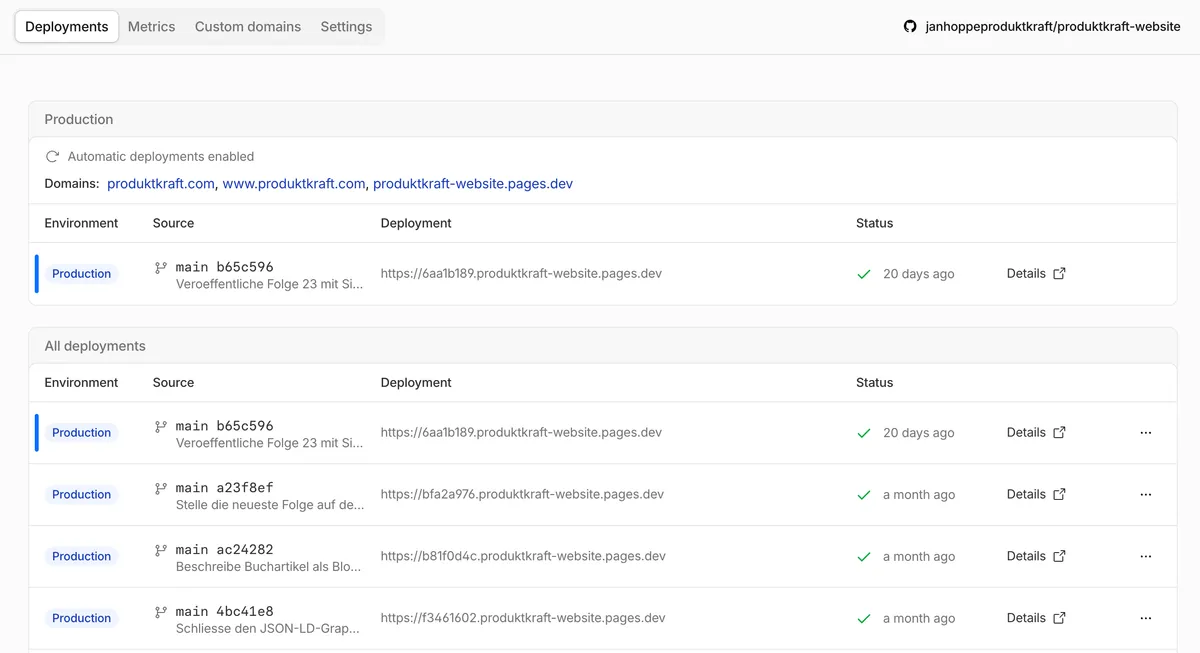
Cloudflare Pages handles the rest: the repository is connected to Cloudflare, and every push to main triggers a build. A few minutes later, the new version is live, distributed across Cloudflare’s network.
Cloudflare isn’t the only option. Netlify, Vercel, and GitHub Pages work on the same principle, and a static site can move between them in an hour. A look at the fine print is still worth it: according to its own guidelines, Vercel’s free Hobby plan is limited to personal, non-commercial use – a company website belongs on the Pro plan there. And according to GitHub’s documentation, GitHub Pages is explicitly not intended for running an online business, an e-commerce site, or a SaaS offering. For a startup, the list of free options shrinks faster than you’d think.
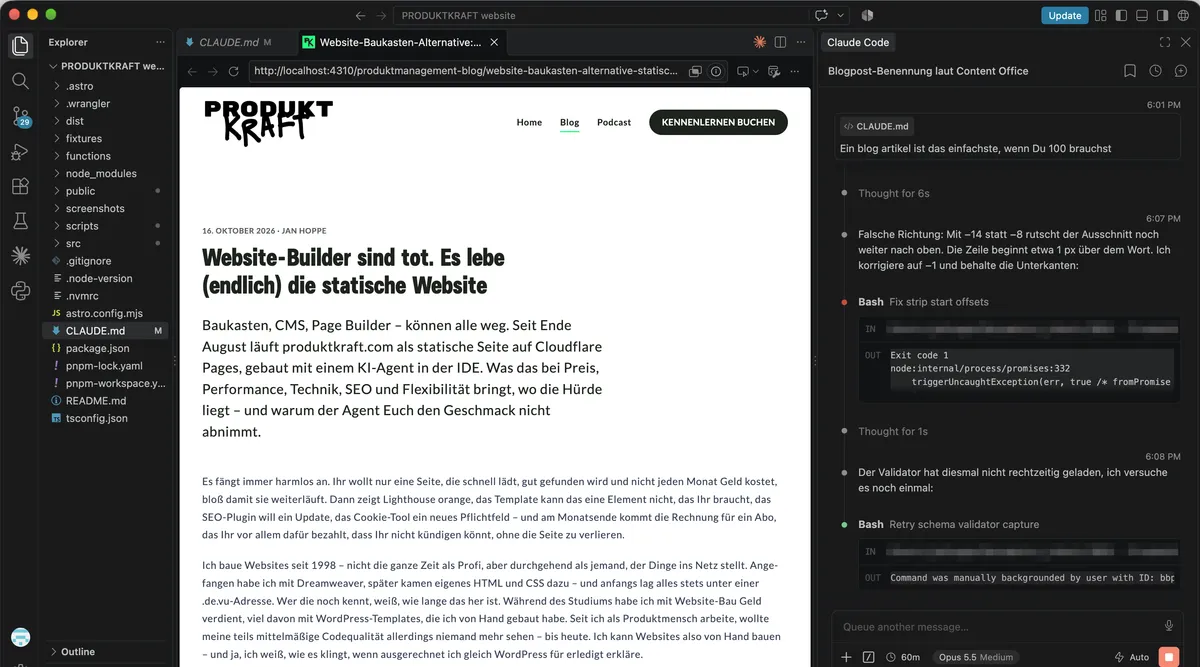
The flip side belongs right here: a push to main is live. There’s no draft mode and no scheduling as in a website builder. In practice, I miss neither, because the preview is your own computer. You start the site locally, it runs on localhost, and every change the agent makes shows up in the browser seconds later. That’s where you iterate, until it’s right – only then do you push.
You only need a staging environment if non-technical people are supposed to take a look. Anyone technical simply pulls the branch and looks at it on their own localhost. That’s why at ganzheit, every branch except main also lands on a staging address behind Cloudflare Access – so that people without an IDE get a link too, one that only the team can open.
Price: Zero Is a Beautiful Number
Let’s start with the argument that lands fastest. On their usual plans, the common website builders and hosted CMSs cost between a few and around 40 euros or dollars a month, billed annually. If you pay monthly, you pay more, and the big plans go well beyond 100 a month (as of the big providers’ pricing pages on October 16, 2026).
At €20 a month, you end up at €1,200 after five years. That’s no drama on its own. It’s just money for an interface you no longer need – and the domain and the one plugin you can’t do without after all often come on top.
Cloudflare Pages costs nothing on the Free plan. According to the Cloudflare docs, it includes 500 builds a month – more than sixteen releases a day. I haven’t managed to hit that limit yet. For large files there’s R2, Cloudflare’s object storage: ten gigabytes a month free, and retrieval costs nothing at all. My podcast episodes live there, around three gigabytes of audio, and every download is free.
What’s left is the domain and the subscription for the AI agent. You probably have that anyway, and it builds you entirely different things besides a website. And unlike the website builder, it doesn’t have to keep running: the site stays online even when the subscription is paused. If need be, you only need the agent for the month in which you build – and then again when something is supposed to change.
Performance: Not a Gut Feeling, but a Red Build
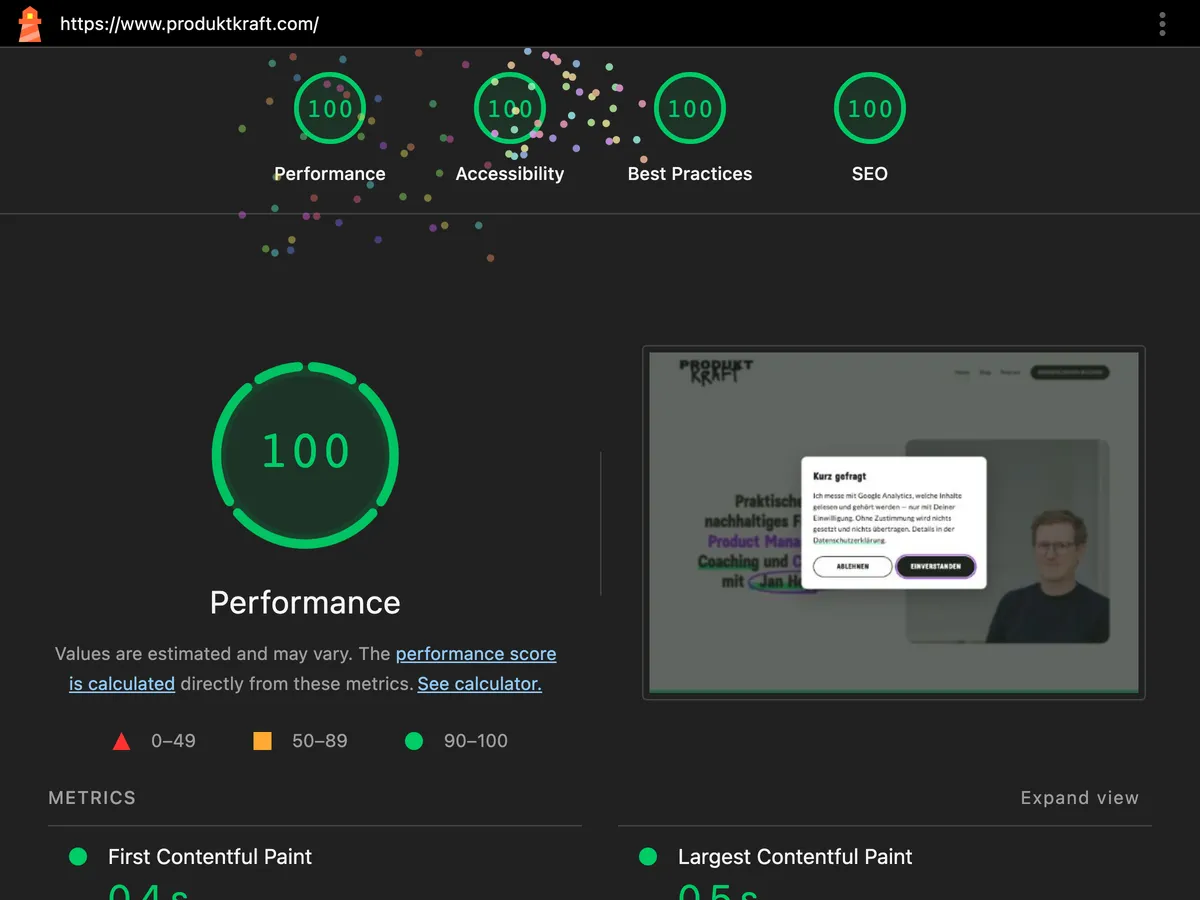
Finished HTML from a global network is hard to beat. For the produktkraft.com homepage in the mobile view, Lighthouse measures 92 points for performance and 100 each for accessibility, best practices, and SEO (measured on October 16, 2026). In between, performance often hits 100 too – and then Lighthouse rains confetti. I had never seen that before in my entire career.
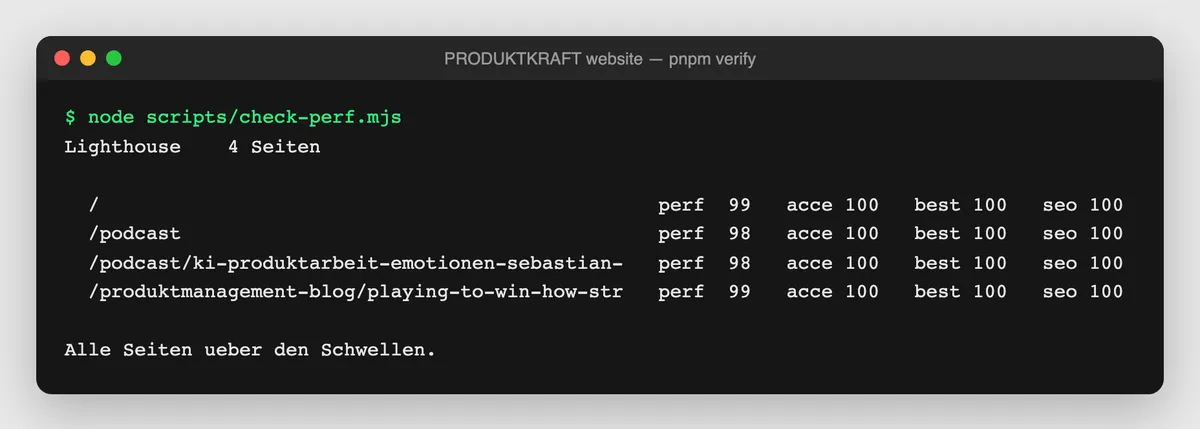
More interesting than the number is that it’s no longer a matter of chance. On every build, Lighthouse runs against four page types – homepage, podcast overview, an episode page with 88 kilobytes of transcript, and a blog article. If one of them drops below 90 points for performance or below 100 for accessibility, the check turns red – and I don’t push. With a website builder, you find out about a slow page when the ranking is already gone. Here, you find out before it’s online.
The check caught me right at the start: locally, it served the stylesheet uncompressed, 59 instead of 19 kilobytes, and the score dropped from 98 to 91. In production, Cloudflare compresses – so now the test compresses too. That’s the kind of detail nobody takes care of in a website builder, because nobody sees it.
Accessibility belongs here for me, not in the legal department. Germany’s Accessibility Strengthening Act (Barrierefreiheitsstärkungsgesetz) has applied since June 2025; micro-enterprises providing services are exempt. So many startups wouldn’t even have to. I still think: Let’s be an ally. When the HTML belongs to you, alt texts, a clean heading hierarchy, and sufficient contrast aren’t a question of the template, but a line in your rules – and a check that turns red when they’re missing.
Technical Excellence as the Default, Not a Project
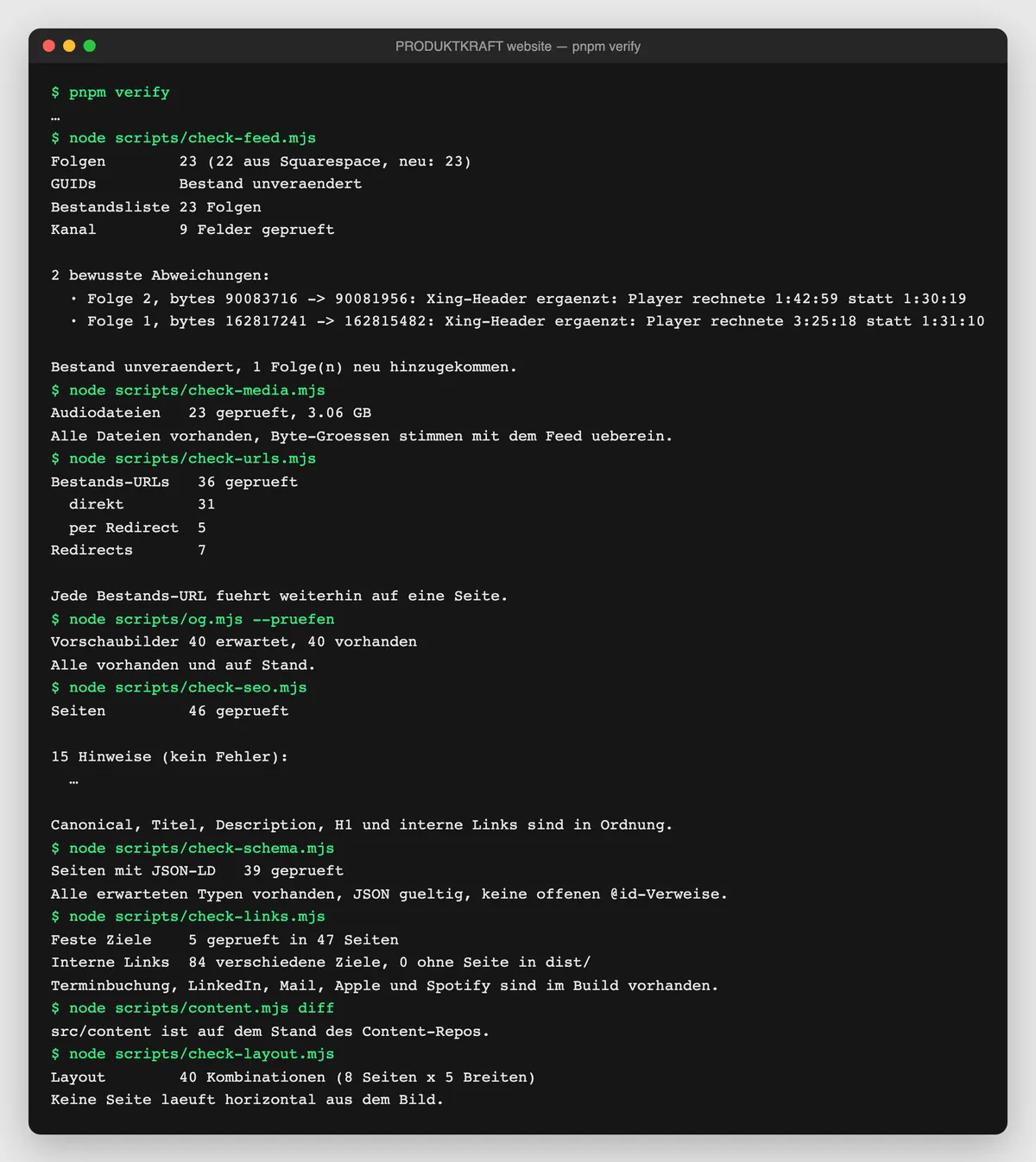
One command, pnpm verify, checks before every deploy whether the build runs through, whether the podcast and blog feeds are valid, whether all audio files are reachable, whether every URL ever published still works, whether the social media preview images are right, whether titles, descriptions, and structured data are complete, whether an internal link leads nowhere, whether anything runs off the screen on a phone – and, of course, performance. None of these checks is rocket science. Each one is the answer to the question of what must never happen again.
The move showed how much control that gives you. For years, podcast apps have been requesting my feed under an address with a query string, the way my old website builder generated it. Instead of a feed migration with a redirect and a lot of nail-biting, a small Cloudflare Function now keeps serving exactly that address. For Apple Podcasts and Spotify, simply nothing changed.
This also covers the topic for which others license a consent management platform along the lines of OneTrust. Here I have to be honest, because the promise of “no cookie banner” isn’t quite true. Under Section 25(2) TDDDG, Germany’s Telecommunications Digital Services Data Protection Act, no consent is needed as long as only technically necessary cookies are set. As soon as Google Analytics, a pixel, or an embedded video comes into play, the banner is back – no matter how the site is built.
What the stack changes: the banner is no longer a third-party script that you license and whose behavior you only half understand, but a piece of your own site. On produktkraft.com, Cloudflare Web Analytics counts visits without cookies; Google Analytics only loads after consent, and before that, Google receives a “denied” signal via Consent Mode. And being forced to build the banner yourself raises the right question: do you need the tracking at all?
Behind this lies a bigger advantage: the less data you process, the less data protection you have to explain. A static site has no database, no user accounts, no form backend, and no platform that brings its own scripts and services along on the side. What’s left fits, in my case, into four bullet points at the very top of the privacy policy: the host sees technical connection data, audience measurement runs without cookies, Google Analytics only with consent – and if you write to me, I read your message. No shop, no newsletter, no contact form. A privacy policy that people can actually read is also a form of respect for the people who visit your site.
ganzheit showed that building it yourself also means making your own mistakes. When we added Google Analytics, the measurement ID was tied to an environment variable in the Cloudflare dashboard. It was missing there – and the site ran without measurement and without a cookie banner. No error, no warning, nothing you could have seen on the site. A short hiccup that was noticed immediately, but an instructive one: since then, the ID has lived in the code, and a check makes sure the banner appears. Lesson learned, check written.
SEO: The Site Is Yours, Down to the Source Code
For 15 of my 21 podcast episodes, my old website builder generated the URL from the title by itself and simply swallowed the umlauts without replacement. If you want to check: my episode about AI-first startups with Henrik Roth still says “grnden” in its address instead of “gründen” (to found). Because a changed URL breaks every link, it stays that way. I now set new addresses myself, short and with the keyword up front.
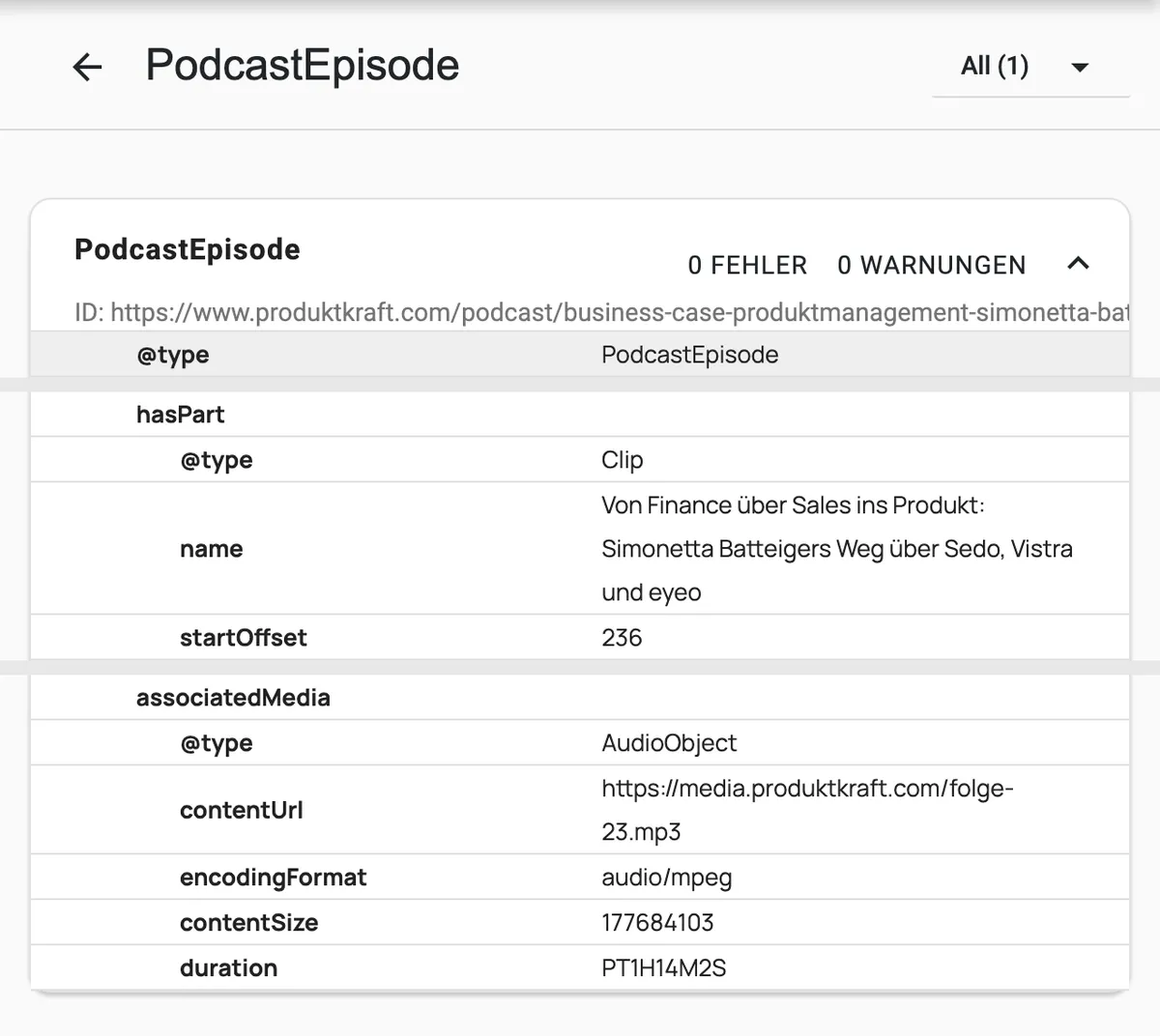
The same goes for everything that search engines and language models read but people never see – above all, schema markup. In a website builder, you get whatever the template comes with, and usually that’s a generic “WebPage.” When the HTML belongs to you, structured JSON-LD according to Schema.org is an instruction to the agent, as precise as you want. On produktkraft.com, the homepage is marked up as Person and ProfessionalService, every podcast episode as PodcastEpisode with AudioObject and its chapter markers as Clip, every article as BlogPosting – for book reviews with the reviewed Book, for essays with the cited sources as citation. Plus a BreadcrumbList everywhere. On every build, a check makes sure that every page type carries its markup, the JSON parses, and every reference in it has a target – because structured data fails silently. The sitemap takes the modification date from the frontmatter, not from the time of the last build. And there’s an llms.txt, a short version of the entire site for language models. How much it matters these days to be found in LLMs was exactly the topic of the episode with Henrik.
In a website builder, something like this is a feature you wait for. Here, it’s one sentence to the agent.
Flexibility: When the Template No Longer Says No

The quietest advantage may be the biggest: there’s no longer a limit that a template vendor has drawn for you. At ganzheit, the same texts that are on the ganzheit website now also produce A4 print materials for patients and coachees – with one command. In a website builder, that would be a second tool, a second data set, and a second place where texts go stale.
Then there’s independence. The content is text files, the site is a folder full of HTML. If Cloudflare triples its prices tomorrow, the whole thing moves to another host in an afternoon. With a website builder, you export an XML file at best and then see what’s left of it. I speak from experience: I needed my own migration script to move out. A provider that makes moving hard isn’t selling you a website, but a lease.
And the content itself? Being able to make a change across all pages in a single, reviewable commit is, for me, the real reason not to want to go back. I’ve dedicated a separate article to that: A Content Repository Instead of a CMS.
A Seed Markdown to Build Your Own
What does this look like in practice? Most people don’t start from zero; they already have a site – in a website builder, with an agency, on WordPress. That’s why there are two paths here: migrating an existing site into the stack I described above, and building from scratch. Both are deliberately kept general – not my real files, but what you could start with.
Both share the instructions for the agent, for example AGENTS.md in the root directory – Codex reads it under that name, Claude Code as CLAUDE.md:
# Website of Example Co.

Static site built with Astro, hosted on Cloudflare Pages.
A push to `main` goes live.

## Rules
- Content lives in `content/`, never in the code.
- Every page has `title`, `slug`, `seo_title` (≤ 60 characters)
  and `meta_description` (140–160 characters).
- Every image has alt text. Headings never go deeper than H3.
- Slugs of published pages are never changed.
- No third-party script without asking first.
- Before every push: `pnpm verify` must be green.

## Brand
- Colors, fonts, and tone of voice: see `brand.md`.
Migrating to the Modern Stack
The path I’ve taken twice myself. The core isn’t the new design, but that nothing gets lost: no URL, no text, no ranking. The first prompt to the agent could look like this – replace whatever is in angle brackets with your real details:
We are moving the website of <COMPANY> from <WEBSITE BUILDER, e.g. Wix> to
a static stack: Astro, content as Markdown in Git, hosting on
Cloudflare Pages. The existing site is at <https://www.your-domain.com>.

If this prompt still contains placeholders in angle brackets, ask
before you start. Then work in this order and stop after each step
so I can review:

1. Inventory: Ask me about the special features of the site before
   you build anything – RSS feeds, podcast feed, newsletter
   integration, forms, shop, embedded services, multiple languages.
   Record them in SPECIFICS.md. Feeds keep their address and the
   identifiers of their entries, otherwise subscribers see everything
   as new.
2. Secure: Read the sitemap of the existing site (usually
   /sitemap.xml) and write every URL to fixtures/live-urls.txt.
   That is the frozen legacy state – it is never changed again.
3. Fetch content: Bring over all pages and articles as Markdown into
   content/, with frontmatter (title, slug, seo_title, meta_description).
   Don't rephrase a single word.
4. Assets and fonts: Download all assets of the live site and put
   them in the repository – images at original size, PDFs and other
   downloads, videos, favicons, preview images for social media. Plus
   all fonts as files, embedded locally instead of through a
   third-party CDN. For every font, check whether the license allows
   self-hosting, and ask if it doesn't. In the end, nothing may still
   load from the old domain – write a check for that.
5. Design: Rebuild the layout of the existing site – colors, fonts,
   spacing. Then two correction loops against the live site:
   screenshots of both versions at the same widths (phone, tablet,
   desktop) side by side, deviations as a list, fix, compare again.
6. Keep URLs: Every URL from fixtures/live-urls.txt leads to a page
   or redirects with a 301. Write a check script for that.
7. Accessibility: Alt text for all images, a clean heading
   hierarchy, sufficient contrast, fully keyboard-operable,
   animations respect reduced motion.
8. Check chain: pnpm verify = build, URL check, internal links,
   SEO fields, and Lighthouse against fixed thresholds (Performance ≥ 90,
   Accessibility 100, Best Practices ≥ 95, SEO 100). Only when everything
   is green do we move the domain.
This exact order still holds up for me today: first the special cases – for me, that was the podcast feed, which Apple and Spotify must under no circumstances recognize as new – then the frozen legacy state in the repository, whose sitemap every build is checked against. A move that silently breaks old links gets noticed this way before it costs rankings.
Building from Scratch
If you don’t have a site yet, start with a first content file, for example content/seiten/leistungen.md:
---
title: "Services"
slug: services
seo_title: "Services: What Example Co. Does for You"
meta_description: "Three offers, one goal: …"
---

## What we do

A paragraph in plain English. No shortcodes, no HTML.

## How working together starts

With an intro call. [Book a call](/contact)
Then you ask the agent to set up the Astro scaffold, adopt the design from brand.md, and keep building page by page. Here, the check chain doesn’t come at the end, but right along with the first page – that way it grows with the site instead of being retrofitted.
How fast does it go? The complete rebuild of produktkraft.com and of ganzheit took one to two working days each. For produktkraft.com, the scaffold with podcast, blog, and both feeds was in place on the first day; for ganzheit, it was the design system, homepage, all subpages, and the blog. And these weren’t business-card sites. produktkraft.com carries a podcast with more than twenty episodes, its own RSS feed for Apple Podcasts and Spotify, a player, chapter markers, and full transcripts. ganzheit has elaborate animations – an audio wave that swings as you scroll it into view, documents on which the lines grow beneath their headings as if they were being written right now – and they work on phones too. If you’ve set reduced motion in your system settings, you get them shown finished and still.
Admittedly: I know what I’m doing, and I knew beforehand what both sites should look like. If you’re doing this for the first time, you’ll need a bit longer. Or get in touch with me: Book an intro call. 🙃 But it doesn’t have to be a pro right away – the seed files above are there precisely so you can try it yourself.
The AGENTS.md then grows along with it. Every mistake the agent makes twice becomes a rule. Every mishap like the one with the measurement ID becomes a paragraph – and a check – so that it doesn’t come back.
The Barrier You Have to Get Through
Now the uncomfortable part. For this to work well, you need three things that sound like developer tools because they are: an IDE, an AI agent inside it, and Git.
I work with VS Code and Claude Code; Toni, the founder of Ocean Material, does it with VS Code and Codex. Whether the agent runs in the terminal, in the IDE, or in the browser hardly matters. What matters is the IDE around it, because it’s the place where you see what the agent is doing: which files it touches, what changes in the diff, whether the build runs through. An agent you only watch in a chat is an agent you trust blindly. It’s the same logic, by the way, that I use to build AI products – which tools you really need for that is in my article on the generative AI tech stack.
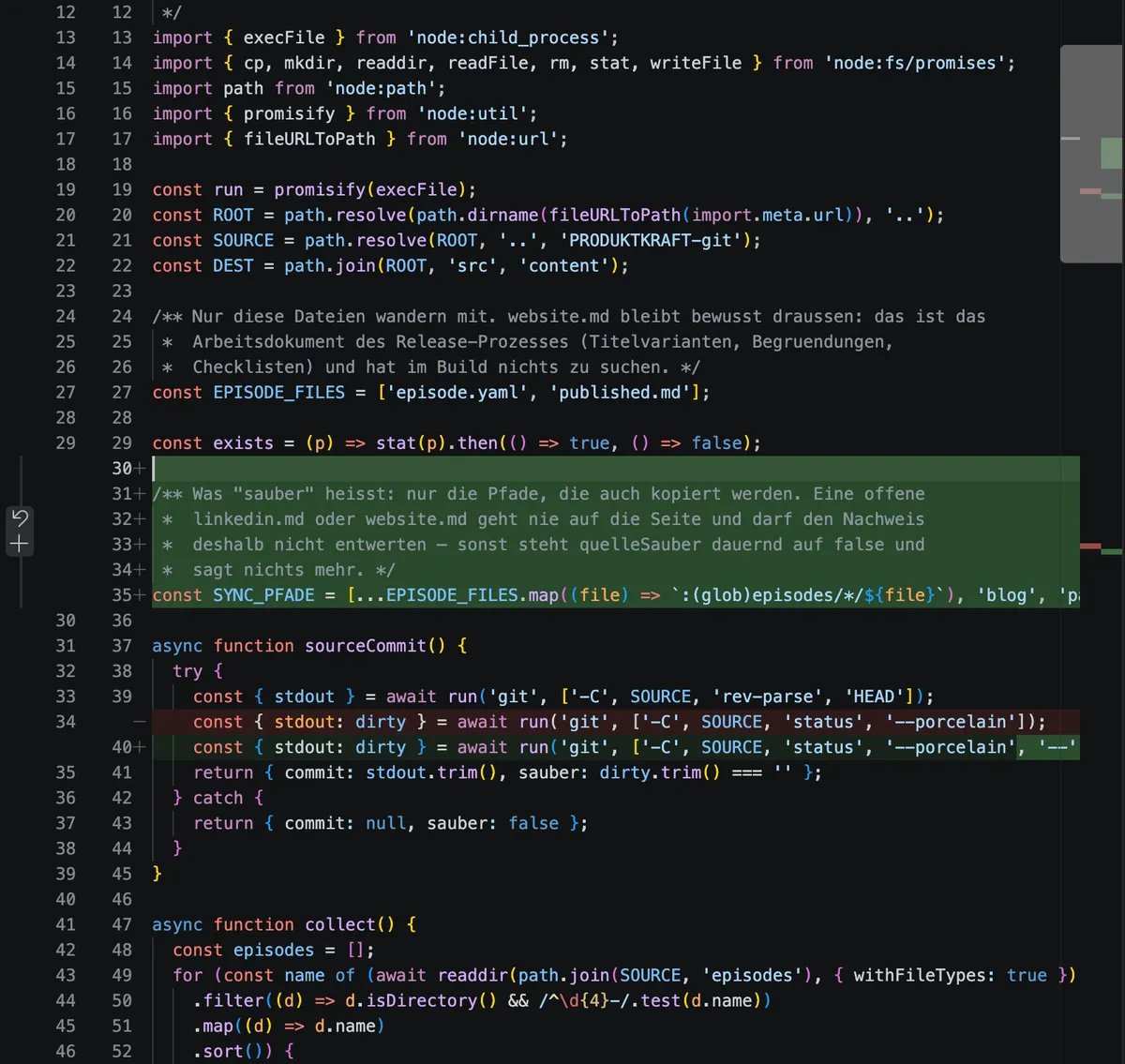
Git is the second hurdle, and I don’t want to downplay it. Commit, branch, push, merge conflict – these are terms that make non-technical founders curse in the first week. The good news: these days the agent handles most of it if you ask it to. The bad news: you should still understand what’s happening, or you’ll get stuck at the first deviation.
Even so, my experience with the founders I’ve made the stack available to has been consistently good: they cope with it and get results. Ocean Material is a visible example – a site that wasn’t built by me, but by Toni himself, with Codex in VS Code. Before, the Ocean Material website was a never-ending project: a WordPress base, many service providers, and endless time spent in coordination – time that a startup simply doesn’t have. Today, Codex understands instructions faster than any agency loop and implements them in minutes.
And if you’re now thinking this is a stack for small sites: right now, the website of one of my clients is about to move to exactly this architecture – a site with many millions of visits a month. Finished HTML from a global network doesn’t care how many people drop by at the same time.
If you want to dig deeper into how far you can get with AI programming without an engineering background, my conversation about vibe coding, no-code, and product work with Hendrik Hemken is a good complement.
Public Service Announcement: The Agent Won’t Take Care of Taste for You
For all the enthusiasm: this stack works well when you know what you want. It works badly when you hope it will tell you.
All three sites I’ve mentioned here – ganzheit, produktkraft.com, and Ocean Material – already had a brand beforehand. Colors, fonts, tone of voice, imagery: all of that was there before the first prompt was written. The agent implemented it, not invented it. At ganzheit, I matched the design against the app’s screens, not against the model’s idea of what a health app should look like.
If, on the other hand, you start with “Build me a nice website for my startup,” you get a website that looks like all the others that started with that sentence. Generous white space, a gradient, three feature tiles with icons. Technically clean, fast, accessible – and completely interchangeable. Language models are very good at hitting the average. But a brand is precisely the deviation from the average.
Then there’s what’s hard to write into an AGENTS.md. I benefit from having put things on the web since 1998. I know why a URL must not be changed, what a canonical link is, why a feed has to keep its GUIDs, and where moves typically cost rankings. The agent knows that too – but only if I ask it. If you don’t know the right questions, you won’t get answers to them.
My conclusion stands nonetheless: website builders and CMSs can go. For founders with a clear brand, some patience for getting started, and the willingness to at least understand Git, a static website with Cloudflare Pages is the better choice today. And if you don’t yet know what you want, no website builder will help you either – it just hides the problem behind a pretty template. Then it’s time to work on the brand, not on the website.
What’s Next
That’s what the sister article is for. It isn’t about the stack, but about what’s inside it: how large content changes can be done all at once, how content, editorial rules, and tone of voice live as files next to the texts, how an agent writes and checks with them – and why that’s the real point of this whole rebuild.