
May 16, 2026 · Jan Hoppe
Stage 2: MVP & Tech Stack – Building a Generative AI Application Step by Step
You understand what your AI is supposed to do – but how do you actually build it now? In this article, I zoom into Stage 2 of my generative AI playbook and describe which technical building blocks you really need to iterate on an MVP application quickly and sensibly: prompt management, tracing, cost monitoring, and the right hosting decision. And at least as important: why you don’t need to worry about RAG and fine-tuning for now. Practical, without buzzwords, and with concrete examples from my own work. The deep dive into MVP & tech stack.
ℹ️ This is the second in-depth article in a series in which I describe, step by step and from a product management perspective, how to build a generative AI application in practice. The introductory article on the generative AI playbook gives an overview of all six stages. The previous part is Stage 1 – Understand.
In the last article, we took our time to understand what our AI is actually supposed to do and what a good output looks like. We played around in the chat with ChatGPT, Claude, or Gemini, iterated through our ideal input/output pairs, derived our first evals from them, and in the end gave ourselves the green light: we developed our own picture of a good answer, and yes, an AI can in principle solve our problem today.
Now it gets serious. We leave the protected playground of chat interfaces and start building a real application. In this article, I zoom into Stage 2 – MVP & Tech Stack – and describe which technical building blocks you really need to iterate quickly and sensibly. And at least as important: which building blocks you don’t need yet at this point, even though many loud voices from the AI hype cycle want to convince you otherwise.
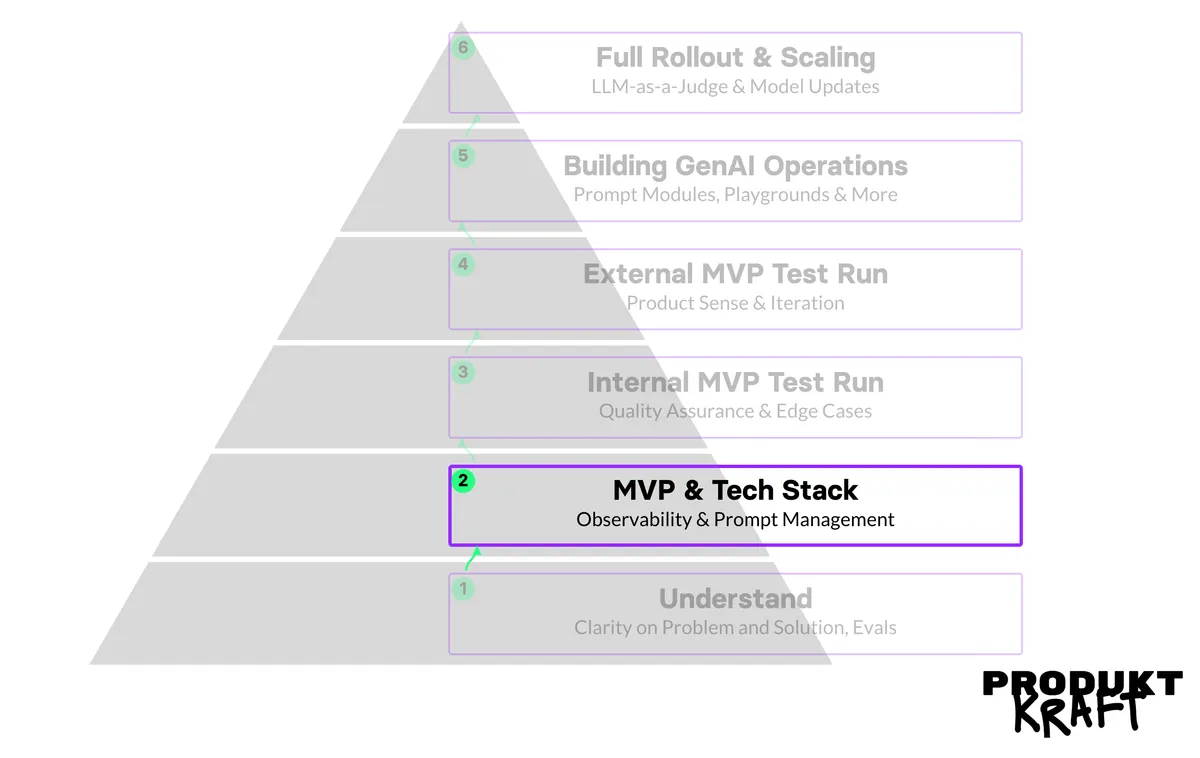
First, some reassurance: even though we are now writing code, the perfectly normal MVP rules we all know from digital product work still apply. Good enough to experiment, Lean Startup, build–measure–learn. Our immediate goal isn’t scaling to thousands of users, but something that gets us learning. With this mindset in the back of our minds, let’s look at the four topics that matter for the initial tech stack.
Prompt Management and Tracing – The Most Important Investment at the Start
If I could pass on just one recommendation at this point, it would be this: use a tool for prompt management and tracing from the very beginning. I know that sounds like tooling overhead in a phase where you really just want to build something quickly. But I assure you that this small investment is worth the time, for two reasons.
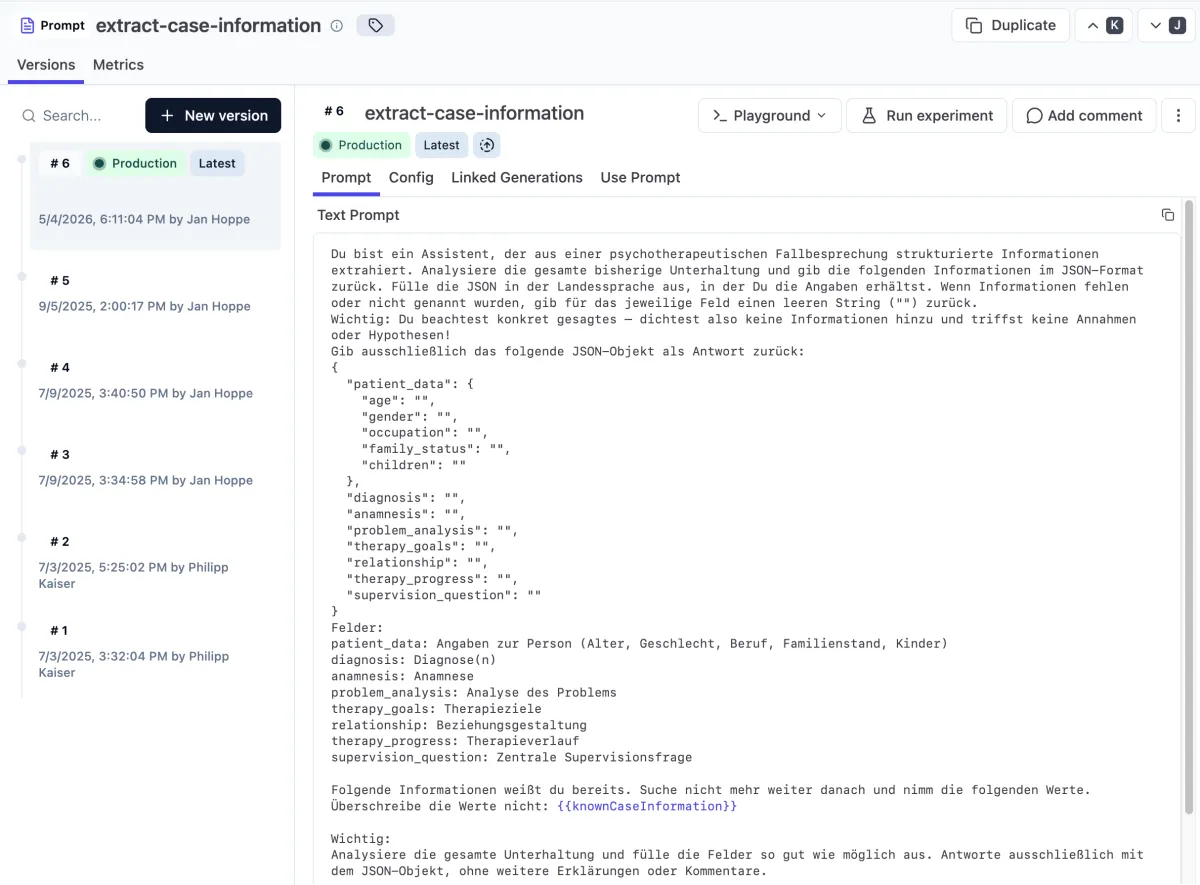
*Example of a versioned prompt in Langfuse
The first reason is mundane: prompts don’t belong in the code. If your prompt lives in the code, then every small adjustment – and you will make a great many small adjustments – needs a deployment cycle. That’s slow, it’s annoying, and above all it shuts non-technical team members out of the iteration process. What you want instead is something that feels like a CMS for prompts: an interface where you can version, change, and deploy prompts without engineering having to step in. Suddenly any product person or domain expert can contribute and test an idea in seconds.
The second reason is at least as important: you have to see what your AI is doing. In classic deterministic software, you know what happens because you programmed it that way. With large language models, you don’t know – you have to look. In concrete terms, that means you need a list of all the inputs that go into your application and all the outputs that come out. This is called tracing, and it is the basic prerequisite for being able to judge how good your answers are at all. Without traces, you’re blind. With traces, you can identify weaknesses, discover edge cases, and expand your evals systematically.
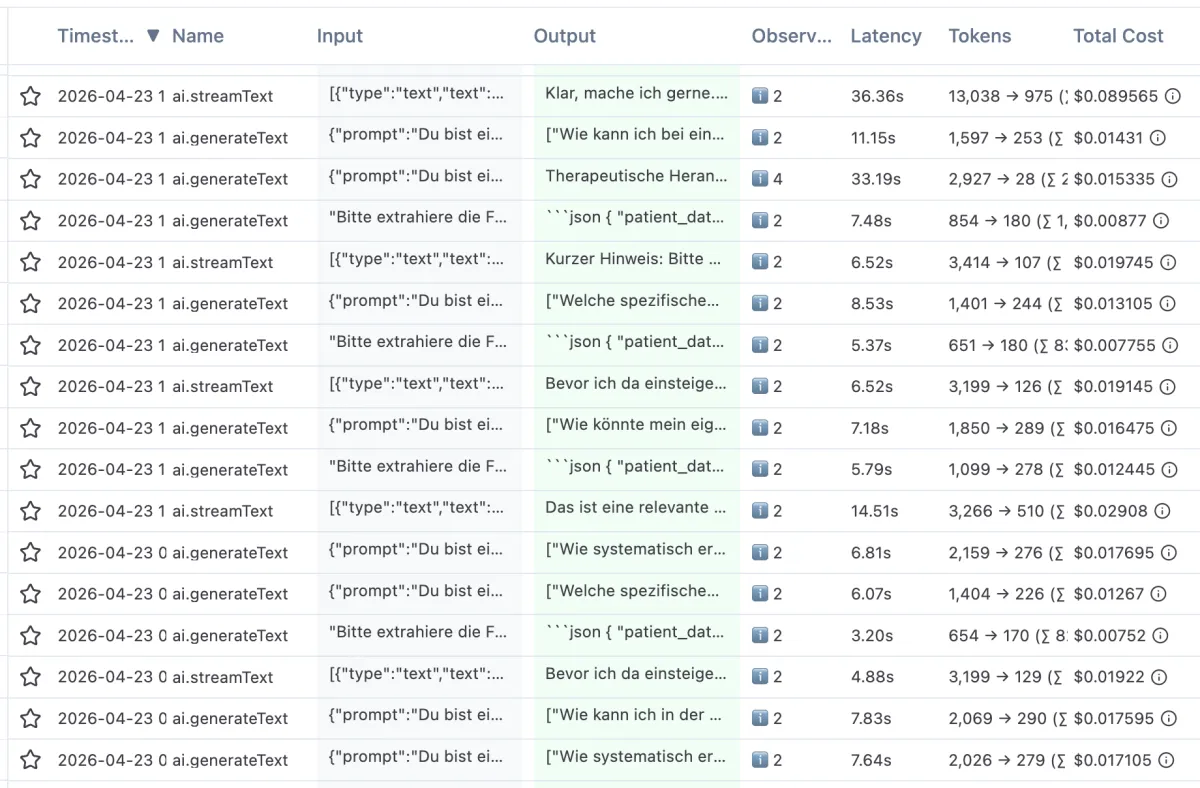
*Example of traces from the ganzheit-app.com staging system
I have personally had good experiences with Langfuse, which I currently use in production in two projects. It’s open source, quick to integrate, and comes with everything you need in the early phase: prompt versioning, traces, cost tracking per call, and annotation of individual responses. Alternatives like Braintrust or LangSmith are also said to be good – but I haven’t worked with them hands-on myself and so can’t offer a direct comparison. More important than the specific choice of tool is that you use one at all. Which one – you can safely leave that in engineering’s hands or decide after a few trial days.
Why Only Prompt Management? What About RAG and Fine-Tuning?
At this point, you might expect a chapter on retrieval-augmented generation (RAG) and fine-tuning. After all, these are the two buzzwords that show up in every other LinkedIn discussion about AI applications. My hot take: in all likelihood, you need neither in Stage 2 – and you shouldn’t bother with them unless you know exactly, for good reasons, why you do need them after all.
Let’s start with RAG. The idea behind it is to fetch relevant documents or data fragments from a vector database and give them to the LLM as additional context. Two years ago, that was often necessary because the context windows of the models back then were small and you simply couldn’t fit the content in. Today the world looks different. The current flagship models have context windows of a million tokens or more – roughly a few thousand pages of text. In the vast majority of cases you’ll face in Stage 2, your relevant documents will simply fit into the context in full. That makes the whole complexity of embeddings, vector stores, and retrieval pipelines simply unnecessary at the start.
There is one exception: if you need real-time data that can’t be loaded into the context once – say, constantly updated product information, hotel room availability, a growing knowledge base, or personalized data from a large user base – then there’s no way around a retrieval solution. But that is a deliberate decision that follows from a concrete requirement, not a default choice at the start.
With fine-tuning, the situation is even clearer. The idea of further training a model on your own data played a role in the early days of LLMs, because the base models simply weren’t good enough in many domains. But today’s flagship models are so good that you definitely don’t need your own training for the first steps. The combination of well-thought-out prompts, good context, and attentive iteration is enough in 99% of cases to build an MVP application. Fine-tuning is expensive, slow, and makes you dependent on model generations – when the next model comes out, you get to retrain. Save yourselves the trouble unless you have a very specific and very well-founded reason in its favor.
The sober truth: in Stage 2, what I’ve just described is enough. Clean prompts, a tracing tool, simple context injection for the relevant documents. Everything else is premature optimization.
Cost Monitoring – Why the Cost Calculation Looks Different from Classic SaaS
One thing I regularly see at the start of AI projects: costs get underestimated. With a classic web application, compute costs are usually so low that as a product person you can almost ignore them. Servers cost a few euros a month, databases are cents per gigabyte, and a single request costs practically nothing. With generative AI, it’s different. Every single LLM call costs money – and not a little.
Let me illustrate this with a personal example. A few weeks ago, I ran an intensive test session in one of my projects. I sat alone at my computer, iterated on different prompts, played through conversations, and tried out edge cases. Classic MVP work, in other words. At the end of the session, I checked the Langfuse overview to see what it had cost: 127 dollars. Within a few hours. Alone. For nothing but test calls.
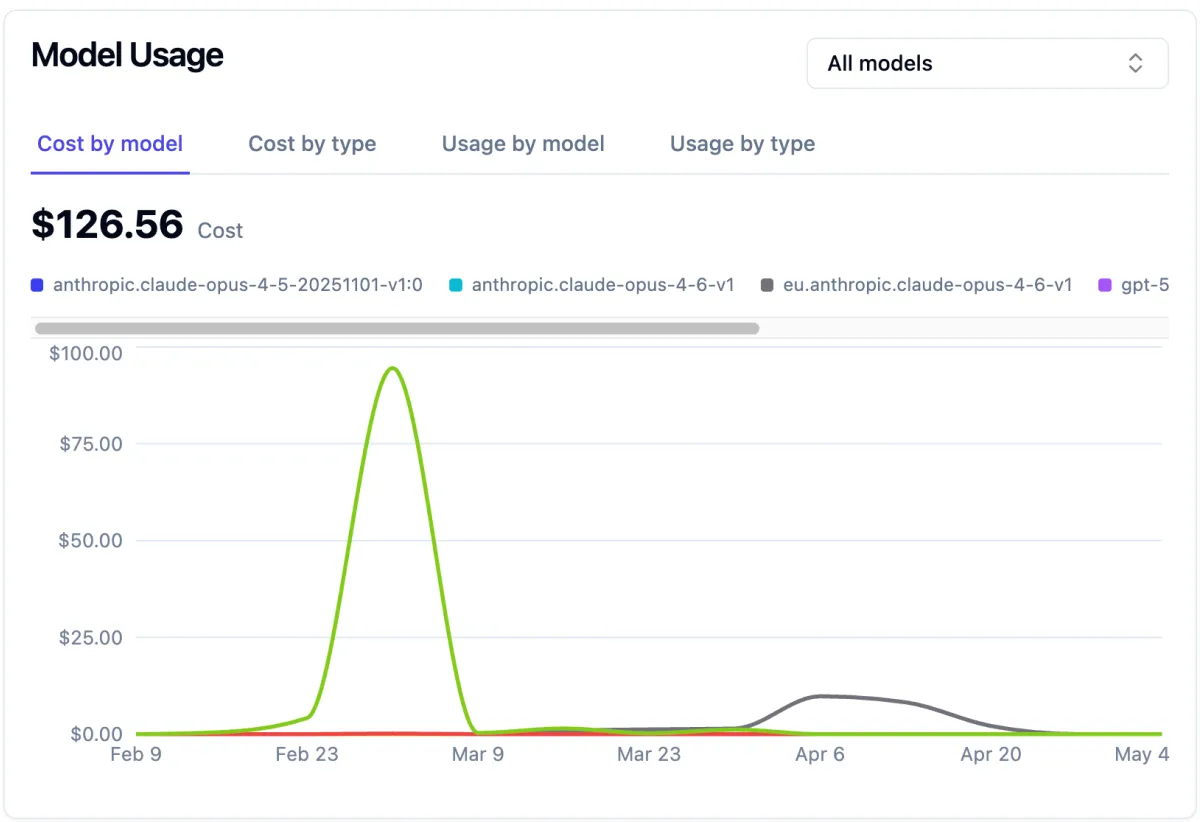
If you extrapolate that to a production environment with real users, it quickly becomes clear what it means. An application with a thousand daily active users can easily cost €500 to €5,000 a month in infrastructure – and that’s without engineering effort, without marketing, without any other fixed costs. Compute is simply more expensive for LLM-based applications than for classic SaaS, because behind every call a huge model is spinning on a GPU, rather than a few simple database operations running.
What does this mean in practice? Keep an eye on costs from day one. Most LLM engineering platforms, Langfuse included, show you per trace, per model, and per day what the inference cost. Look at it regularly. Develop a feel for roughly what a single call costs and how prompt length, model choice, and output length affect the costs. This is central to the later question of the business case. An AI that solves your problem, but at costs that exceed any possible price, simply isn’t a solution.
Three levers that make the biggest difference in practice: first, model choice. The flagship model that convinced you in Stage 1 is usually not the model you need for every call in production. Simple classifications, formatting, or routing decisions often run just as well on a much cheaper model – Haiku instead of Opus, Mini instead of Pro. Try that out early. Second, output length. A model that returns a JSON with three fields costs a fraction of what a detailed explanation costs. If you don’t need running text, constrain the format hard. Third, prompt caching, which all the major providers now support: if your system prompt and context are identical between calls – which is almost always the case in an MVP – you pay only a fraction for the repeated part. Turning it on is usually a matter of minutes and can halve inference costs.
Data Protection – API Calls or a Self-Hosted LLM?
The topic of costs leads straight to the next one: data protection and hosting. Depending on what your application does and what data it handles, you have to ask yourselves early on whether a direct API call to Anthropic, OpenAI, or Google is acceptable in your setup at all. For an internal data analysis tool, that may not be a problem. For an application with medical data, attorney-client confidentiality, or other particularly sensitive content, it quickly looks different.
One point that often gets stuck in discussions with legal departments, and that you can refute right away: through the API access of the major providers, your inputs and outputs are not used to train the models by default. This applies both to the direct APIs from Anthropic and OpenAI and to the routes via AWS Bedrock, Azure AI Foundry, and Vertex AI – in all five cases, training is off by default, without you having to opt out. That is an important difference from consumer products like Claude or ChatGPT, where the default behavior has looked different since the policy changes in late summer 2025. So if someone in the discussion objects that your data will “disappear into the AI” – in the API context, that’s simply wrong.
More good news: even if, for data protection reasons, you can’t call the LLMs directly via API even with training disabled, there are clean solutions that don’t require much in-house development. AWS Bedrock, Azure AI Foundry, and Google Enterprise Agent Platform offer exactly these big models, but hosted within the respective cloud boundary, with clear data processing agreements and the option to restrict processing to specific regions. If you’re already on one of these platforms, that’s usually the most pragmatic route.
In terms of cost, this option usually turns out slightly more expensive than calling the API directly, but much less so than you often hear. Per-token prices at the big hyperscalers now largely match those of the direct Anthropic API for Claude models. The noticeable markup of around 10% only comes into play when you use region-pinned endpoints – that is, exactly the configuration you would typically choose for data protection reasons. A ten percent surcharge is a price worth paying for your data not leaving the cloud boundary.
One last point that matters to me here, because it persists stubbornly as a myth: data protection with a self-hosted or cloud-hosted LLM is not fundamentally different from data protection in classic SaaS. I keep hearing voices claiming that AI is a fundamentally new risk category that needs its own legal assessments. That’s nonsense. In the end, we are dealing with sophisticated statistical models that run on computers, process the same data as any other software, and are subject to the same data protection regulations. If you can host a classic web application in compliance with the GDPR, you can also host an LLM application in compliance with the GDPR. No more and no less. (A small note: of course, you have to consider where the data is processed not only for the LLM’s work, but also for tracing – but that, too, is easy to solve.)
Don’t let this mystification unsettle you. You need the same expertise as always – nothing more.

What Does This Tech Stack Do for Generative AI Applications?
If you’ve worked through Stage 2 properly, your setup looks roughly like this: you have a first version of your application that covers a real use case. Your prompts are versioned in a prompt management tool and not in the code. Every single call is captured as a trace, so you can follow what went in and what came out. You have an eye on costs and know roughly what a typical user call costs you. And you’ve made a hosting decision that fits your data protection needs.
Deliberately left out: vector databases, fine-tuning, your own models, a complex agent framework, multi-step reasoning pipelines with five different LLMs working together. All of these are tools in the LLM toolbox, but they belong in later stages, once it’s clear that the simpler solution no longer carries the problem. In Stage 2, the goal isn’t elegance but the ability to learn. You want something tangible that you can seriously test with real people, and that you can adapt quickly when you see in testing that something doesn’t fit.
That’s exactly where we’re headed next. In Stages 3 and 4 – the internal and external MVP test runs – we take the application in hand and hand it over first to friendly users and then to strangers to see what happens. You’ll find that your users do things with your product you never expected, and that the list of edge cases suddenly gets much longer than you thought. That’s not a bad thing – that’s exactly the point. We don’t build perfect software. We build software that gets better on contact with reality.
The article on Stage 3 will follow soon, as soon as I have time. Until then: set up your tracing, write your first prompts with proper versioning, and look at the cost side. That is the foundation for everything that follows. And if you want to keep going right away, take a look at the overview article.